
These are the standard 80x30 buttons of the websites of my fellow frens that I met on the indie web.
Feel free to check them out and to link my button, just ping me and I’ll add yours back.



These are the various computer systems that I have and use on a daily basis.
DaServ
This is the power sipping beast of a server.
It runs Proxmox and is managed by Ansible for state as code.
This is where all of my services are hosted and where my ZFS pool lives.
The services are all ran with podman-compose inside of an unprivilged LXC container.
The UEFI I am using this on has had the microcode update for the voltage regulation issue applied as soon as I bought it new, so no issues there.
With all the SAS HDDs, the controller setup, the massive amount of ARC/L2ARC, and ZFS tuning this bad boy gets a ton of bandwidth, about 1GB/s
Specs
CPU: Intel Core i7 14700k (Raptor Lake)
GPU: Intel UHD Graphics 770 (with SRIOV driver so it can be split 7 ways)
RAM: 128GB 5400MHz DDR5 Cruical Pro (RIP Cruical)
Storage:
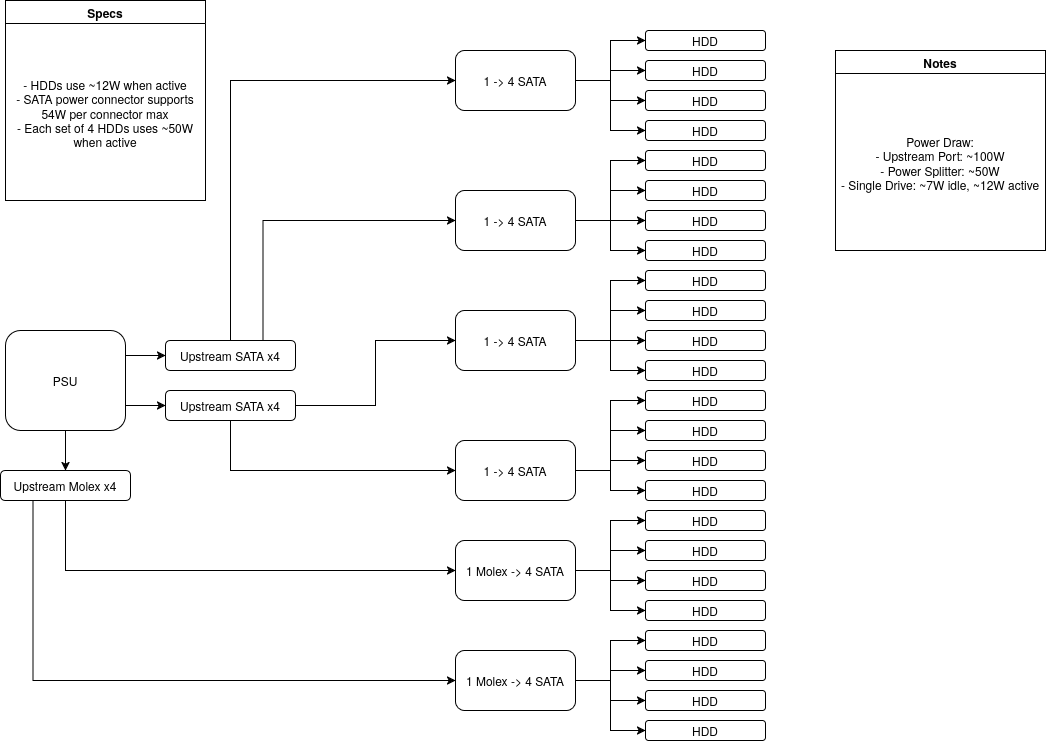
- Primary ZFS Pool: 25x4TB WD HC310 12Gbit SAS HDD (4x striped 6-wide RAIDZ2 with 1 hot spare)
- Secondary ZFS Pool/Offline Backup: 6x14TB SATA HC530
- Third Level Backup: a bunch of random HDDs with Borg backups on them
- Root: 2x512GB nVME (btrfs mirror)
- Cache: 2x512GB nVME for ZFS L2ARC
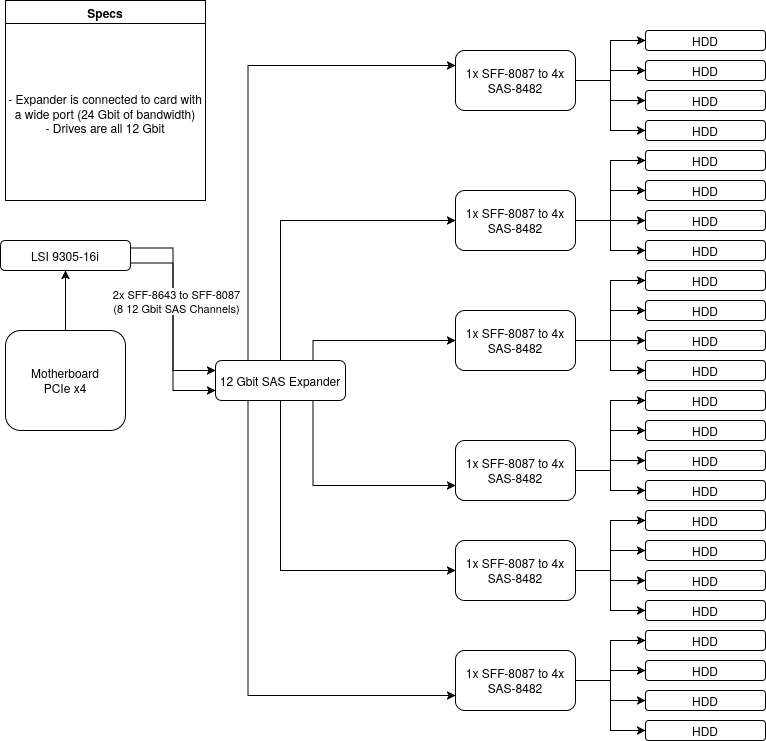
- Controller: LSI 9305-16i (IT Mode) connnected to an HP DL380 G9 SAS 12Gbit expander with a wide port (24 Gbit/s of bandwidth)
- Layouts: Power and Data
Motherboard: MSI Z790 Gaming Plus Wifi (Wifi is disabled for security and power savings)
Power Supply: Corsair RMx750W PSU
Case: This open-air testbench from Amazon: https://www.amazon.com/dp/B0D69J9HDQ
Cooler: Thermalright Peerless Assassin 120 SE (got this specific one because the testbench case has a low cooler tolerance due to the HDDs)
UPS: APC Smart-UPS 950W 1000VA (Has Vortex’s monitor and networking equipment connected)
JumpServ
This is a Hetzner VPS I use to route everything through. Initially it was because I started this server when I lived at a place that had gigabit fiber BUT was behind a double NAT.
Now I just do so because I’m moving a ton and it is very nice to have as it makes the entire setup essentially plug and play anywhere I go, assuming I have a fast enough internet connection.
This node literally just runs a base enterprise Linux system running as a tailscale exit node and caddy for reverse proxying.
The HTTP services (such as this website) are routed through caddy which does a proxy_pass to the actual server over tailscale, other services are merely port forwarded to the server over tailscale.
It’s one of the smallest VPS options I could get in the Virginia datacenter, due to my server being in Southeast.
Vortex
Now this is my beast of a gaming PC that I’m on almost daily. This is where all the blood, sweat, and tears go.
It’s gone through several revisions, but this is the latest one.
There are no bottom fans because of the severe lack of clearance between the bottom of my 3+ card GPU and the bottom of the case.
Specs
CPU: AMD Ryzen 9950X3D
RAM: 64GB Corsair Vengenance Pro RGB White 6000MHz (with lighting kit)
Motherboard: Gigabyte B850 Aorus Wifi6 ICE MATX
- It came with some Wifi6 Realtek card but I changed it to a Wifi6 Intel card from my laptop, as it is far more stable than the Realtek card when using Bluetooth and Wifi at the same time in a heavily congested RF area.
Cooler: Corsair iCUE Link Titan 360 RX
GPU: XFX Mercury 9070XT w/ Mag Fans
Storage: 2TB nVME for Linux/Windows, 4TB nVME SSD (Crucial P310) for games
- Cursed with only two nVME slots instead of 3, and my GPU is too big to use the last PCIe slot.
Case: Lian Li A3 mATX White (with glass side panel)
Fans:
- Rear Intake: 1x Corsair LX120-R iCUE
- Top Exhaust: 3x Corsair RX120 (on AIO)
- Bottom Intake: 3x Mag Air fans (on 9070XT)
RGB: All plugged into an iCUE System Hub/Commander Duo and controlled by OpenLinkHub
Keyboard:
- Primary (Home): Rainy75 Plus White Switches changed from Kalih Purple to Panda lubed, keycaps were changed from the OEM to a kit I got from Microcenter.
The escape key is a special key cap, they are all cat themed and they even have a JIS layout on them.
Keyboard weighs like ~4.5 pounds but sounds amazing to type on.
- Secondary (Work): Corsair K65 Plus
Bandaid mod done to noisy keycaps and stabilizers.
Mouse: Razer DeathAdder V3 Pro (Don’t like Razer, but this mouse was on sale and works fine without the software)
PSU: ASUS ROG Loki SFX-L 850W Platnium White Edition (w/ RGB Fan)
Monitor:
- Primary: LG UltraGear 45" OLED (5K2K WUHD 165Hz)
- Secondary (used for internships and temp moves): HP EliteDisplay E242 24" IPS LCD (1920x1200 60Hz)
Mods/Deco:
- I have a VSDISPLAY 7.84" 1280x400 LCD screen on the case. It is connected to a Raspberry Pi Zero 2W running Alpine. The Pi just runs Xorg, mpv, and openbox/compton. It purely acts as a remote display for conky running on the main machine. MPV is for the animated background.
- RGB color scheme is “wave” set to Miku’s colors.
- The AIO is set to a GIF of the vtuber Rachie as Miku from Monitoring (custom made, compressing that GIF was hard)
- My wallpaper is Hitori Goto via linux-wallpaperengine, best thing since sliced bread.
Yoshi
This is the new version of Yoshi that I got to replace the old Samsung. It even has a smartcard reader.
I repasted it with PTM7950 and new 13W thermal pads, also flashed the 130W vBIOS from the 17" model’s A4000 onto mine.
I also disabled BD PROCHOT# with setup_var and undervolted the CPU so it’s a performance beast while gaming, even if it’s from 2022.
Not only did I undervolt it but I slightly turned up the turbo ratios and tuned down the power levels, as the CPU on its own can draw ~100W when plugged in for minimal performance gains over capping it at 70W which gives the GPU more headroom.
I had to disable BD PROCHOT# because it kept capping the CPU at 800MHz for no reason.
Specs:
Model: Dell Precision 7560
CPU: 11th Gen Core i7-11850H (8c16t)
RAM: 64GB 3200 DDR4 (4x16GB SODIMM)
Storage: 1TB nVME for Windows, 1TB nVME for Linux, and a 2TB nVME for games
GPU: nVidia RTX A4000 Mobile (mobile equivalent of like an RTX 3070) with the 130W vBIOS, and the iGPU from the i7.
Display: 15.6" Matte LCD 1920x1080 (the 500 nits one)
Charger: 240W Dell OEM with Dock